Execution flow
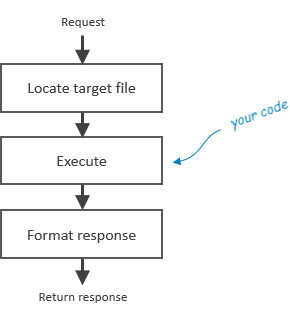
Boomla was designed around a simple and likely familiar concept.
Locate target file
Boomla is built on a filesystem. When a request is made, Boomla will look up the file matching the URL of the request.
In the traditional world, when a visitor goes to index.php, the PHP
interpreter will be executed due to the file extension being php.
In the Boomla world, there are no file extensions, instead files have a type property. The file type determines the app that shall be executed.
Execute
Boomla has a built-in JavaScript engine called sjs-4 that runs on the server.
It also has an sjs-4e dialect used for templating that is pretty much like
PHP.
If the type of the target file is any of the engines, the code in the target
file will be executed much like it would be in case of an index.php file in the
traditional world.
Alternatively, the file type may specify a user space app, which is either written by you or someone else. Let us come back to this later below.
What makes Boomla stand out is how easy and clean it is to delegate work. Again, see below.
Format response
Boomla does some post-processing before returning the response to the visitor. This mostly affects text/html responses. Boomla does stuff here that most people don’t care about - but benefit from having solved centrally.
Examples of what happens:
- Authentication code is injected if required.
- Boomla Toolbar and other client-side tools are injected to support editing.
- Browser security is configured (Content-Security-Policy header).
- The response is compressed if possible.
That’s it! It is almost too simple, so naturally you may wonder how this helps building rich websites.
Building rich websites
Web pages have contents. Imagine categorizing logically separate stuff on
a page. It could be a menu, a header, a footer, some main text block and maybe
a comment area. In Boomla, these are called contents and they are stored in
individual files. Your page file is simply a template with placeholders for the
contents. This could be a valid page template the sjs-4e engine understands:
<div class="wrapper">
    <div class="left">
        <?== source.select('menu').inline(false) ?>
    </div>
    <div class="right">
        <?== f.query(':2').inline() ?>
    </div>
</div>
source.select('menu') will find the menu file, .inline(false) will execute
and return it so that it can be injected into the HTML document.
:2 will select all files in bucket 2 on the filesystem stored within the
page. They could be any kinds of contents like text elements, images, galleries,
videos, you name it.
Note that contents may also require other resources like stylesheets of JS files
via the <head> of the response. To support that, one can register those on the
response file, which will be passed up nicely on the type chain. No magic, no
global side-effects.
User space apps
You will typically have a few page templates and no more. Storing the template code in the page file itself is a bad idea, as editing in a single place is easier. To support this, you can turn any code into an app.
In its simplest form, a page-template app may contain the following files:
/page-template
/page-template/.Request
The .Request file would contain the relevant code. If you are familiar with object
oriented programming, the layout will look familiar. .Request is a method of
the app that is executed when a request is to be served. Similarly, there is an
.Inline method that is executed for inlining contents in pages.